Why Your AI Images Look Pixelated — Quantization, Distillation & Inference
I spent 18 minutes generating an image that looked like a bad oil painting. Here's the exact threshold where quantization breaks down — and why distilled models can't use negative prompts.
I waited 17.5 minutes for this:
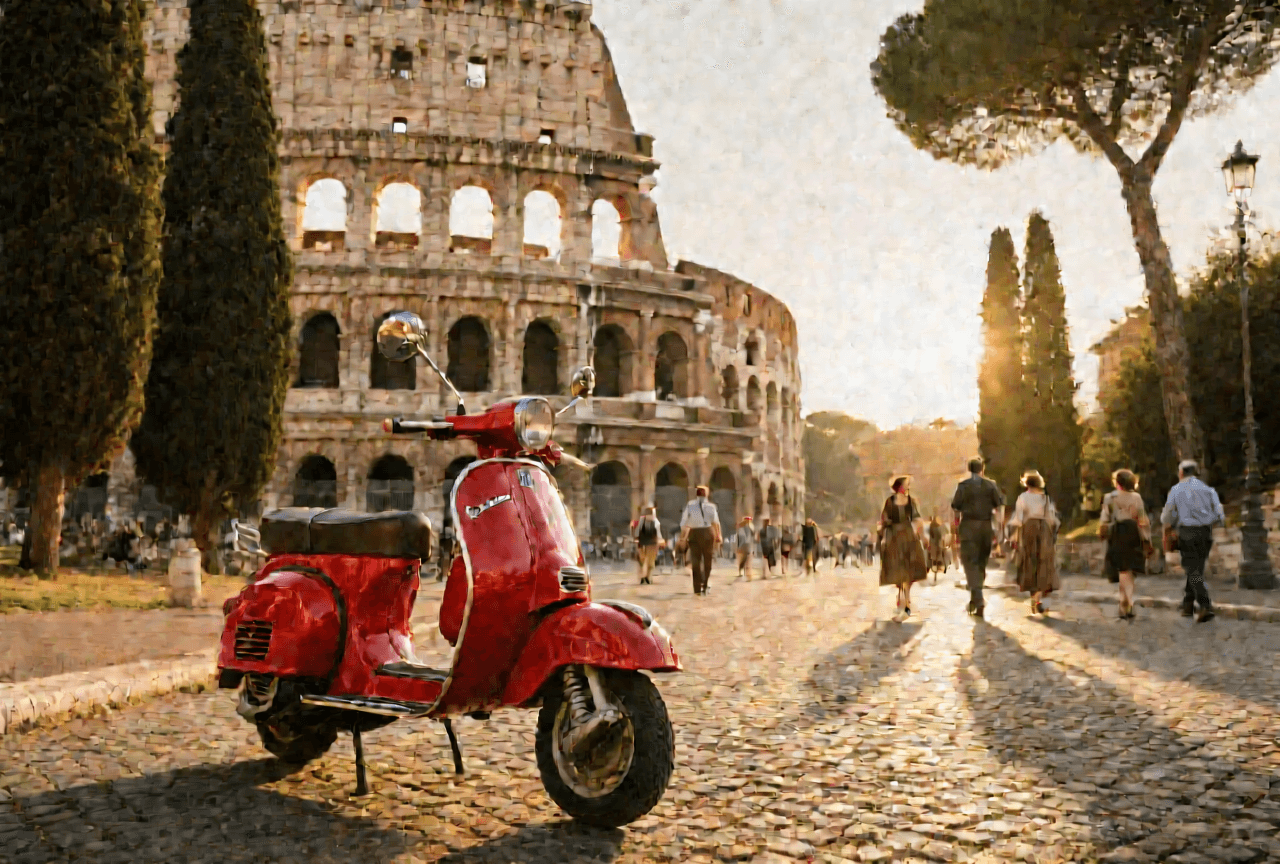
Qwen Image 20B, -q 4, 1280×864, 30 steps. Colosseum prompt, seed 7742. Seventeen and a half minutes.
The stone textures are gone. The sky gradient looks like it was applied with a sponge. The Vespa exists in concept only. This is what happens when you push a 20 billion parameter model to 4-bit quantization and wait for the result.
The frustrating part: I had no idea this was coming. I expected some quality loss. I got an oil painting.
In the previous post, I covered the three models I run locally — Klein, Dev, and Qwen — with real benchmarks and routing logic. This post covers what's actually happening under the hood: why quantization degrades quality, why the degradation isn't smooth, and why distilled models like Klein architecturally cannot support negative prompts or custom guidance.
TL;DR:
- Quantization reduces weight precision from 16-bit to fewer bits — 4-bit uses 25% of original memory, but quality falls off a cliff on large models
- The degradation is non-linear: q4 on a 20B model looks bad; q6 looks good; the jump between them is dramatic
- mflux always downloads full bf16 weights and quantizes at load time — but
mflux-savelets you persist quantized weights to skip this on future runs - Distilled models (Klein) can't use negative prompts or custom guidance because they eliminated the classifier-free guidance mechanism that makes those features work
- A 4B model at full precision renders better textures than a 20B model at 4-bit — model size only wins when you can afford the precision
What Quantization Actually Does to Model Weights
A neural network is a massive collection of numbers — weights — each stored at some level of precision. The default is bfloat16: 16 bits per weight. A 20B parameter model at bf16 is roughly 40GB of raw weights.
Quantization reduces that precision. If a weight is 0.73291:
- At 8-bit, it might store as
0.73— close, rounding error is small - At 6-bit, it stores as
0.72— rounding error grows - At 4-bit, it stores as
0.7— noticeably imprecise
Each individual rounding error is tiny. Across 20 billion weights, those errors compound — especially in the layers responsible for fine-grained detail.
| Quantization | Bits per Weight | Memory (20B model) | Quality Impact |
|---|---|---|---|
| bf16 (full) | 16 | ~40GB | Baseline |
| q8 | 8 | ~25GB | Minimal loss |
| q6 | 6 | ~20GB | Slight loss, usually acceptable |
| q4 | 4 | ~14GB | Visible artifacts — the cliff |
| q3 | 3 | ~10GB | Severe degradation |
The memory reduction is real. The quality impact is not proportional.
mflux Always Downloads the Full Model
I expected this to work like downloading a pre-quantized checkpoint — pick -q 6, get a 20GB download.
That's not what happens. mflux downloads the full bf16 weights regardless of quantization level, then quantizes them in memory at load time using Apple's MLX framework. Qwen is always a ~54GB download. The quantization happens at runtime.
This is different from the GGUF approach used in text LLMs (llama.cpp), where you download a pre-quantized file at your chosen precision. GGUF files are smaller on disk and faster to load, but you need a separate file for each quantization level. MLX's approach trades disk space for flexibility — one download, any quantization at runtime.
The practical consequence: even at q4, the initial load briefly requires enough memory to hold the full weights. On my 48GB machine, loading Qwen at q8 pushed the system close to the ceiling — the process appeared to die silently before eventually completing after an extended load time.
The workaround I found late: mflux-save lets you persist quantized weights to disk. Run it once, and future loads skip the full-model quantization:
mflux-save \
  --path "/Users/me/models/qwen-q6" \
  --model qwen-image \
  --quantize 6
After saving, point mflux-generate-qwen to the saved path for faster startup. I didn't discover this until after running several experiments the slow way.
The Cliff: q4 vs q6 vs q8 on Qwen
Same prompt, same seed (7742), same resolution (1280×864), same steps (30). Only the quantization level changed.
q4 — 17.5 minutes, ~14GB RAM:
Stone detail lost. Sky looks painted. The Vespa barely reads as a vehicle.
q6 — 18.3 minutes, ~20GB RAM:

Dramatic jump. Stone textures visible, sky gradient clean, Vespa recognizable. Same prompt, 0.8 minutes longer.
q8 — 21.4 minutes, ~25GB RAM:

Noticeably sharper than q6 — edge definition, texture depth. Best output, but the load nearly saturated available RAM.
The q4 result isn't an artistic choice. It's degradation. What surprised me was the gap between q4 and q6 — not a gradual slide, but a cliff.
Why the Degradation Isn't Linear
Diffusion models generate images by iteratively refining from noise. Each denoising step has the model predict what should be removed — where noise ends and signal begins. That prediction requires accurate internal representations of textures, edges, gradients.
Those representations live in the weights. At 4-bit, you're discarding roughly 75% of the precision those representations were trained with. Error accumulates across layers — each layer's output becomes the next layer's input, and the compounding doesn't happen linearly.
Two kinds of information respond differently:
-
Semantic understanding survives. Even at q4, the Colosseum had the right arches. The Vespa was recognizable. World knowledge is encoded in large-scale weight patterns that are robust to quantization.
-
Spatial detail dies. Stone texture, smooth sky gradients, precise edges — these require subtle weight values that 4-bit simply doesn't have enough representable numbers to encode. The rounding errors across 20 billion parameters show up as exactly what I saw: smeared textures, stepped gradients, painterly blobs.
At q6, enough precision survives that the compounding error stays bounded. At q4, it doesn't. That's the cliff.
And here's the non-obvious insight: a 4B model at full precision renders better textures than a 20B model at 4-bit. Klein at bf16 (~8GB) produces cleaner spatial detail than Qwen at q4 (~14GB). The larger model's advantage in world knowledge doesn't help when the rendering quality falls apart. You get a Colosseum that's structurally correct but looks like a Monet.
Distillation: What Klein Gave Up for Speed
Klein generates an image in 12 seconds. Dev takes 1.5 minutes minimum. That gap has a specific cause.
Knowledge distillation trains a smaller "student" model to imitate a larger "teacher" model. Klein (4B parameters) was step-distilled from the FLUX.2 9B base model. The student learned to converge in 4 steps what the teacher needed many more to produce.
But distillation also changed the inference architecture. And those changes explain the two failures I hit immediately in Part 1:
Error: negative-prompt is not supported for FLUX.2
Error: guidance is only supported for FLUX.2 base models. Use --guidance 1.0
These aren't missing features. They're architectural consequences.
Why Negative Prompts Are Architecturally Impossible
Base models use Classifier-Free Guidance (CFG) — a technique from Ho & Salimans (2022) where the model runs inference twice per step:
- Conditioned pass: generate using your prompt ("Colosseum at golden hour...")
- Unconditioned pass: generate with no prompt (or with the negative prompt)
The final output is interpolated between the two:
Higher guidance means stricter prompt adherence — you're pushing harder toward the conditioned result. Very high guidance (8+) degrades quality because you're overshooting.
Negative prompts plug into the unconditioned pass. When you specify --negative-prompt "blurry, low quality", that text replaces the empty conditioning. The model steers away from "blurry" by the guidance scale amount.
Distilled models skip the dual-pass entirely. Klein was trained to produce good results in a single forward pass per step. The teacher's CFG behavior was baked into Klein's weights during distillation. There's no unconditioned pass to inject a negative prompt into. And guidance is fixed at 1.0 because there's no interpolation between two passes to scale.
These won't get fixed in a future mflux version. The architecture doesn't have the mechanism.
Steps and Guidance: What the Parameters Actually Control
Steps (Denoising Iterations)
Generation starts from random noise and iteratively removes it. Each step runs the full model to predict and subtract noise.
- More steps = cleaner image, up to a point. 10 → 20 steps is dramatic. 30 → 50 is usually invisible.
- Distilled models converge faster — Klein at 4 steps, because each step was trained to do more work.
- Each step has a fixed cost. On Qwen at q6, each step takes ~36 seconds. The sweet spot matters: 30 steps = ~18 min. 50 steps = ~30 min for marginal improvement.
| Model | Sweet Spot | Why |
|---|---|---|
| Klein (distilled, 4B) | 4 steps | Optimized during distillation. More doesn't help. |
| Dev (base, 12B) | 20 steps | Inflection point between quality and time. |
| Qwen (base, 20B) | 30 steps | Larger model benefits from more refinement passes. |
Guidance Scale
Controls CFG interpolation strength. Only works on base models.
| Range | Behavior |
|---|---|
| 1–2 | Loose — creative interpretation |
| 3–4 | Balanced — default (3.5) |
| 5–7 | Strict — heavy prompt adherence |
| 8+ | Degrades — over-optimization artifacts |
I mostly leave this at 3.5. The times I bumped it to 5.0, Qwen included an element it was ignoring — but the overall image was slightly less natural.
What to Run on Your Hardware
This is the part Part 1 didn't cover — specific recommendations by RAM tier:
16GB (MacBook Air, base Mac Mini)
- Klein only. Full precision, ~8GB, no quantization needed.
- Dev at q4 technically fits but quality may suffer. Qwen won't load — the initial bf16 → quantized conversion alone exceeds available memory.
24GB (MacBook Pro M3 Pro)
- Klein + Dev at q8 (~13GB). The practical sweet spot.
- Qwen at q4 fits (~14GB) but you'll see the oil-painting artifacts.
36GB (MacBook Pro M3 Max)
- Dev at q8 comfortably.
- Qwen at q6 (~20GB) — this is where Qwen becomes usable. 16GB headroom.
48GB+ (Mac Mini M4 Pro, Mac Studio)
- Qwen at q6 as the sweet spot. Plenty of breathing room.
- Qwen at q8 (~25GB) for best quality — close other memory-heavy apps first.
- Dev at full precision (no
-q) — ~24GB. Worth trying to see the difference without any quantization artifacts.
What I Got Wrong
I assumed quantization was a smooth dial — less memory for proportionally less quality. It isn't. It's a cliff function. You're fine, you're fine, you're fine — and then you're looking at a Colosseum made of clay.
I also assumed bigger model = better output in all cases. Only true when you can afford the precision. The model size advantage only kicks in when you have the memory to keep the weights precise enough for spatial detail to survive.
And I initially saw Klein's limitation with negative prompts as a software bug — surely a future mflux update would fix it. It won't. It can't. Understanding why made the constraint feel less arbitrary and more like a legitimate engineering tradeoff: 12-second generation, and the cost is giving up fine-grained prompt control.
The 17.5-minute oil painting wasn't a wasted run. It's exactly what I needed to understand what quantization is actually doing — not abstractly, but concretely, in pixels.
The models aren't black boxes. They're weighted functions operating at a precision you choose. Choose wrong and you get blurry stone and a Vespa that barely exists.
Choose right and you get the Colosseum at golden hour, accurate arches and all.
All benchmarks from Mac Mini M4 Pro, 48GB unified RAM, mflux v0.16.6. Part 1: Running AI Image Generation Locally on Apple Silicon.