
Running AI Image Generation Locally on Apple Silicon
I ran three AI image models locally on a Mac Mini M4 Pro. Real benchmarks, real failures, and a routing guide for when to use Klein, Dev, or Qwen.
There are three AI image models I run locally, and picking the wrong one costs you either quality or 18 minutes.
The fast one — Klein, 4 billion parameters — generates an image in 12 seconds. The quality one — FLUX.1 Dev, 12B — takes about 1.5 minutes and gives you full control over the output. The smart one — Qwen Image, 20B — took 18 minutes to generate a Colosseum scene that got the architecture right: correct arches, correct structure, recognizable Vespa in the foreground.
What's not obvious until you try: each model has a different CLI command, different constraints, and different failure modes. I learned most of these the hard way on a Mac Mini M4 Pro with 48GB unified RAM. Here's what routing between them actually looks like in practice.
TL;DR:
- Three models via mflux: Klein (fast), Dev (quality), Qwen (world knowledge)
- Klein: ~12s, no setup friction, Apache 2.0 — but distilled, so no negative prompts, no custom guidance
- Dev: ~1.5 min at q8, full control, requires HuggingFace auth + license acceptance
- Qwen: 18+ min, best for text and real-world accuracy, needs quantization
- Use the wrong CLI command and you get a cryptic failure with no helpful hint
- A future post (coming soon) covers why quantization degraded Qwen's images so dramatically
Why Run Locally At All
The honest reason: I didn't want to pay per image while experimenting.
API-based image gen charges per generation. When you're running 20 variations of a prompt trying to understand how guidance scale affects output, that adds up fast. Local means unlimited iteration at the cost of waiting.
The other reasons held up too. Privacy is real — prompts don't leave your machine. Offline capability matters when you're running batch jobs overnight. And there's something different about watching your own hardware do the computation. You start paying attention to what's actually expensive.
On Apple Silicon specifically, the economics are better than almost anywhere else. The unified memory architecture means the GPU has access to all system RAM — not a separate VRAM pool capped at 8GB or 16GB. A Mac Mini with 48GB means you can load a 20B parameter model that would require a $3,000+ NVIDIA GPU elsewhere. That gap is real.
mflux: The Tool That Makes This Work
mflux is an MLX-native implementation of FLUX and related image generation models. MLX is Apple's own ML framework for Apple Silicon — operations run natively on the Metal GPU without copying data between CPU and GPU memory.
Install:
uv tool install mfluxVersion tested: 0.16.6. The CLI is still evolving, so version matters.
The thing that tripped me up immediately: mflux is not one command. Each model family has its own CLI entry point:
| CLI command | Model family |
|---|---|
mflux-generate | FLUX.1 models (dev, schnell) |
mflux-generate-flux2 | FLUX.2 Klein (4B, 9B, base) |
mflux-generate-qwen | Qwen Image (20B) |
Use the wrong one and you get a cryptic failure. There's no "did you mean..." message.
The Three Models
FLUX.2 Klein 4B — The Fast One
Klein is a distilled 4B parameter model. Distillation means a smaller model was trained to imitate a larger model's behavior — the result is 4 inference steps instead of 20–50, and about 12 seconds per image at 768×1024.
mflux-generate-flux2 --model flux2-klein-4b \
  --prompt "a misty forest at dawn, soft golden light filtering through ancient pine trees, fog rolling across the forest floor" \
  --steps 4 --seed 42 --width 768 --height 1024

Generated by FLUX.2 Klein 4B in ~18 seconds. No quantization, ~8GB RAM.
RAM usage: ~8GB. No quantization needed. Apache 2.0 license — outputs are fully commercial.
What you can't do:
# Fails — distilled models have no CFG mechanism
mflux-generate-flux2 --model flux2-klein-4b --prompt "..." --negative-prompt "blurry"
# Error: negative-prompt is not supported for FLUX.2

# Also fails
mflux-generate-flux2 --model flux2-klein-4b --prompt "..." --guidance 3.5
# Error: guidance is only supported for FLUX.2 base models. Use --guidance 1.0
These aren't CLI bugs you can work around — they're architectural. Distillation bakes the guidance behavior into the weights. I'll cover the mechanism in a future post.
Klein is my default for anything exploratory. The constraints are real, but the speed makes it the right starting point.
FLUX.1 Dev 12B — The Quality One
Dev is a 12B parameter base model. Full control: negative prompts work, guidance is adjustable (default 3.5, useful range 1.0–7.0), and the quality ceiling is noticeably higher.
The friction: Dev is gated on HuggingFace.
# Step 1: authenticate
hf auth login

# Step 2: accept the license at huggingface.co/black-forest-labs/FLUX.1-dev
# (browser required — no CLI shortcut)

# Step 3: generate
mflux-generate --model dev \
  --prompt "a brutalist concrete building, overcast sky, sharp architectural photography, angular geometric forms, moody atmospheric light" \
  --negative-prompt "blurry, distorted, low quality, lens flare, people" \
  --guidance 4.0 --steps 20 --quantize 8 --seed 42 \
  --width 768 --height 1024
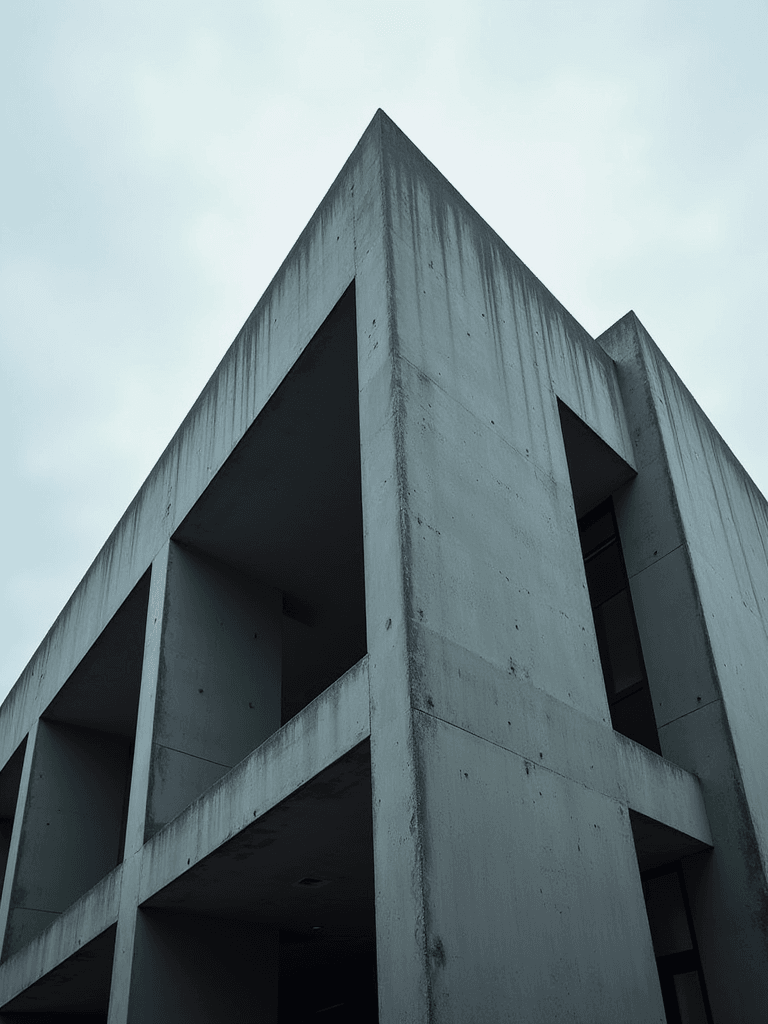
Generated by FLUX.1 Dev at q8 in ~4.5 minutes. 20 steps, guidance 4.0.
RAM with -q 8: ~13GB. Download size: ~34GB — always the full bf16 weights regardless of quantization level. Quantization happens at load time, not download time.
Speed: ~1.5 minutes at 512×512 with 20 steps, longer at higher resolutions (the example above at 768×1024 took ~4.5 minutes).
License note: non-commercial for the model, but outputs are fully usable commercially. Section 2.d of the FLUX.1 Dev license explicitly covers this. Blog posts, client work, YouTube thumbnails — all fine.
Qwen Image 20B — The Smart One
Qwen is different in kind, not just scale. Built on a vision-language model backbone, it carries semantic understanding of the real world. Prompt it for the Colosseum and it renders architecturally accurate arches. Prompt it for a Vespa and you get a recognizable Vespa.
mflux-generate-qwen \
  --prompt "The Colosseum in Rome at golden hour, with a vintage red Vespa scooter parked in the foreground, Italian cypress trees, cobblestone street" \
  --steps 30 --quantize 6 --seed 7742 --width 1280 --height 864
I ran the same prompt at three quantization levels. The visual difference is significant:
q4 — 17.5 minutes:
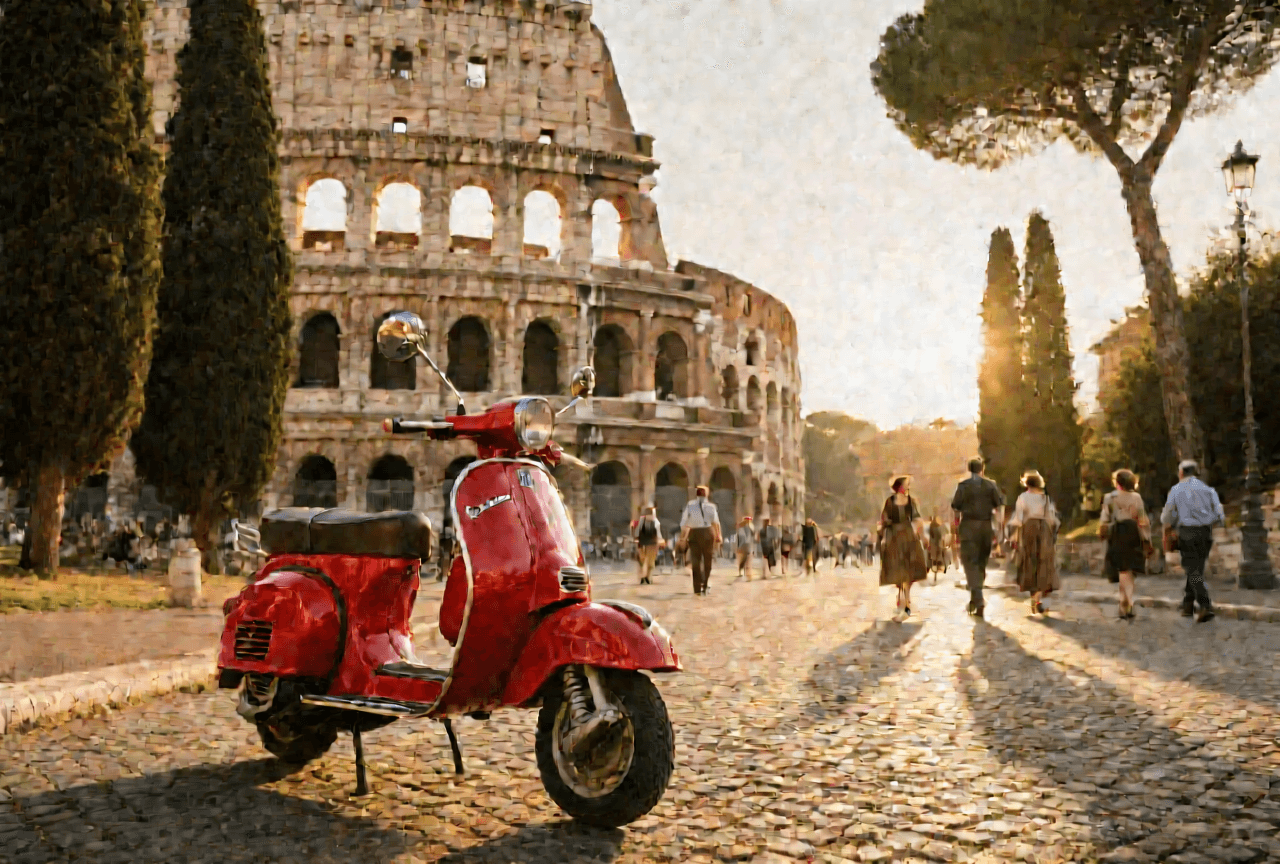
At -q 4, textures degrade into a painterly blur. Stone detail lost, sky gradients blobby.
q6 — 18.3 minutes:

At -q 6, a clean jump in quality. This is the sweet spot on a 48GB machine.
q8 — 21.4 minutes:

At -q 8, the best output. Noticeably sharper than q6, but the extra time and memory pressure make q6 the practical sweet spot.
The q4 result isn't stylistically painterly — it's degraded. Fine stone textures gone, sky gradients blotchy. The jump from q4 to q6 is dramatic. Q6 to q8 is real but subtler. Why this cliff exists is worth a dedicated post — coming soon.
Qwen also handles things the FLUX models can't: readable text in images, non-Latin scripts, and image editing modes (style transfer, object insertion). If any of those matter, Qwen is the only option in this stack.
How I Actually Choose Between Them
Use Klein when:
- Iterating on a prompt and need fast feedback
- Subject is generic (landscapes, abstract scenes, portraits)
- Don't need fine-grained style control
Use Dev when:
- Negative prompts matter for steering the output
- Quality is the priority and a few minutes is acceptable
- Generating something you'll actually publish
Use Qwen when:
- Subject is a specific real-world place or object where accuracy matters
- Text needs to be readable in the image
- Doing image editing (style transfer, object insertion) — the FLUX models can't do this
My actual default: start with Klein. Escalate to Dev only if quality isn't good enough. Reach for Qwen only when accuracy or text rendering genuinely requires it. Most of the time, Klein is enough.
The Gotchas I Wish I'd Known
1. mflux downloads full models regardless of quantization.
No pre-quantized downloads. You always get the full bf16 weights (~34GB for Dev, ~54GB for Qwen) and mflux quantizes in memory at load time. Total disk for all three models: ~96GB at ~/.cache/huggingface/hub/.
2. Dev requires browser-based license acceptance.
hf auth login is not enough. You have to visit the model page and click accept. First attempt without this: GatedRepoError: 401 Client Error. Accept first, then pull.
3. Each model family has its own CLI command.
Covered above, but worth repeating: mflux-generate ≠ mflux-generate-flux2 ≠ mflux-generate-qwen. The wrong command doesn't always fail loudly.
4. Klein's constraints are not bugs. No negative prompts, guidance fixed at 1.0. These won't get fixed in a future version — they're consequences of the architecture. Once you understand why, the constraints feel less arbitrary.
Full Benchmark Table
All tests on Mac Mini M4 Pro, 48GB unified RAM, mflux v0.16.6.
| Model | Quantize | Resolution | Steps | Time | RAM | Quality |
|---|---|---|---|---|---|---|
| flux2-klein-4b | None | 768×1024 | 4 | ~12–18s | ~8GB | Good |
| FLUX.1 dev | q8 | 512×512 | 20 | ~1.5 min | ~13GB | Excellent |
| FLUX.1 dev | q8 | 768×1024 | 20 | ~4.5 min | ~13GB | Excellent |
| Qwen Image | q4 | 1280×864 | 30 | ~17.5 min | ~14GB | Degraded |
| Qwen Image | q6 | 1280×864 | 30 | ~18.3 min | ~20GB | Good |
| Qwen Image | q8 | 1280×864 | 30 | ~21.4 min | ~25GB | Best |
What I Still Don't Know
I haven't run a head-to-head comparison of Dev and Qwen on identical prompts at their respective quality peaks. My intuition is Dev wins on photorealism for generic subjects; Qwen wins where world-knowledge accuracy matters. That's a hypothesis, not a controlled result.
Resolution scaling on Dev is also an open question. The 512×512 benchmark is well-tested; how it degrades at 1280×864 is something I want to measure properly.
What's Next
A follow-up post is coming: why the q4 Qwen images degraded so badly, how quantization works technically, and why Klein architecturally cannot support negative prompts or custom guidance. If the why behind these behaviors interests you, that's where I'll cover it.
Three models. Three tradeoffs.
Klein for fast iteration. Dev when quality is the point. Qwen when accuracy actually matters — architecture, text, real objects you can't afford to get wrong.
Just be prepared to wait.
All tests on Mac Mini M4 Pro, 48GB unified RAM, mflux v0.16.6.